Studio & Recording

Record, edit, and produce from one studio.

Capture crystal-clear audio, invite remote guests, and edit like a pro. MyPodOps Studio gives you everything you need to record better and publish faster.
Trusted by creators and studios worldwide
1M+Hours Recorded
98.7%Uptime Reliability
4.9/5Creator Rating
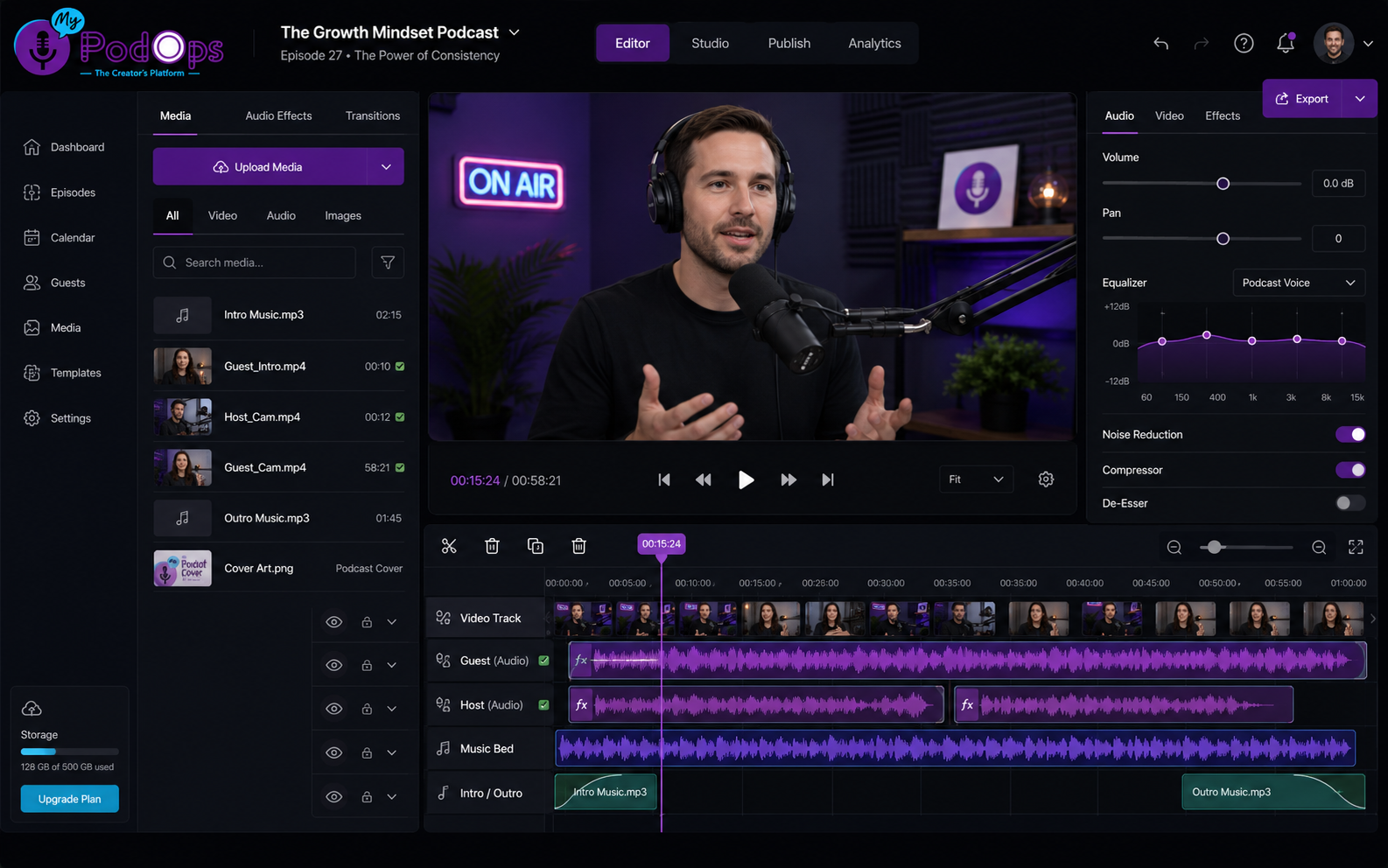
MyPodOps Studio editor with multi-track waveforms
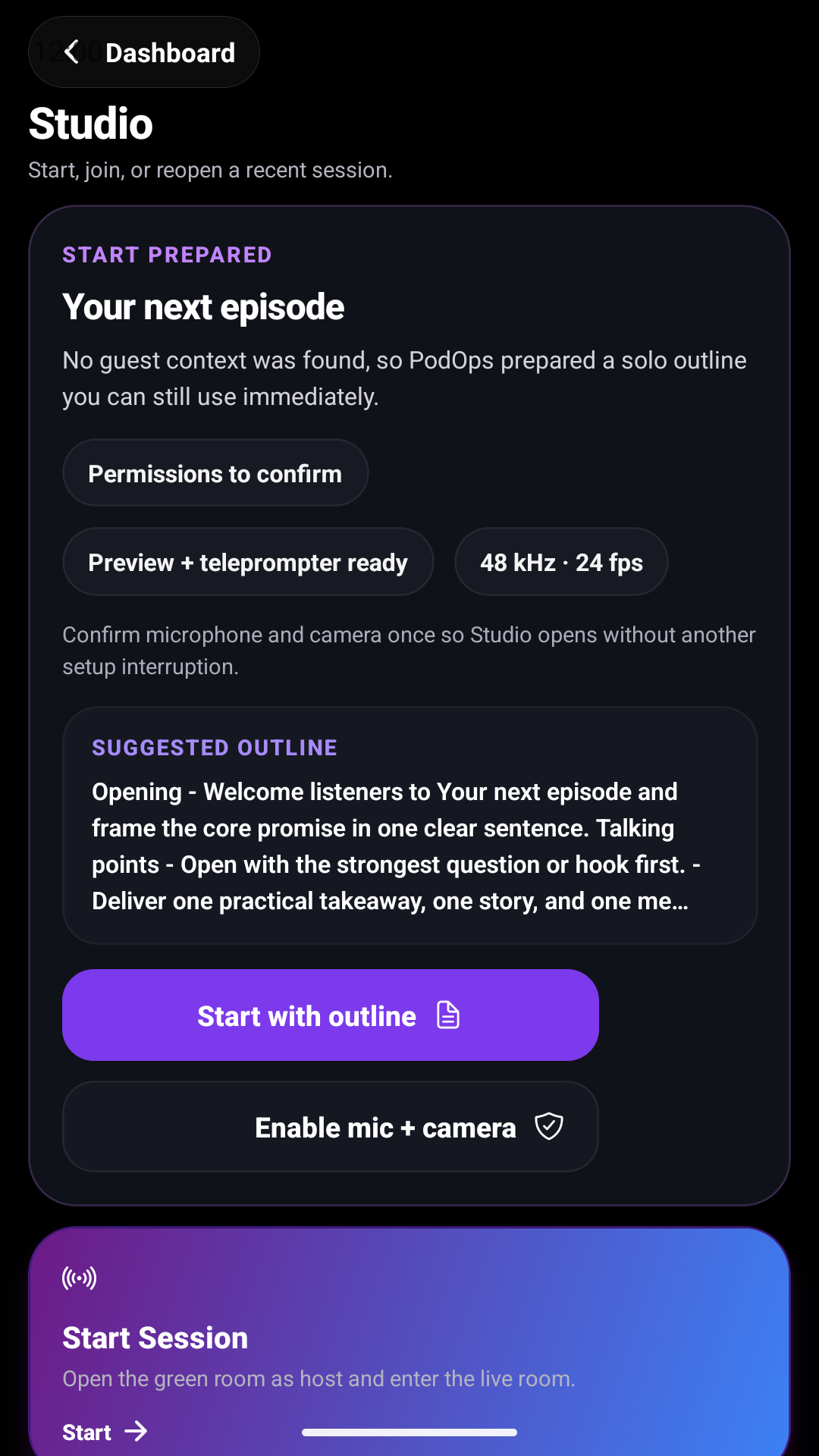
Studio recording session on mobile
Transcript
Sarah Chen 00:01:24That's a great point about automation changing how we create content.
Mike Johnson 00:01:47Exactly. The key is using the right tools to stay consistent.
You (Host) 00:02:12Let's dive into the workflow that saves us hours every week.
RecordStudio quality audio
Edit with AIFaster post-production
PublishEpisodes everywhere
Core Studio Features

Everything you need to record like a pro

Whether you're recording solo, interviewing guests, or producing a full show, Studio is built to simplify your workflow.

Browser Recording

Record studio-quality audio directly in your browser. No downloads, no setup.

Up to 4K audio qualityNoise reduction built-in

Remote Guests

Invite unlimited guests with one link. Crystal-clear audio, every time.

Up to 10 participantsAuto-levels & echo cancellation

Separate Tracks

Record each speaker on their own track for complete editing control.

Individual audio tracksPerfect for post-production

AI Audio Cleanup

Remove background noise, filler words, and long silences automatically.

AI noise reductionMulti-track editing tools

Live Monitoring

Monitor audio levels in real-time and ensure every take sounds perfect.

Live level metersQuality indicators

Cloud Backup

Your recordings are automatically saved and backed up to the cloud.

Automatic cloud saveNever lose a recording
MyPodOps Studio editor
Multi-Track Timeline Audio Waveforms AI Tools & Effects Speaker Labels Transcript Sync Clip Markers
Powerful Editor

Edit with precision and speed

MyPodOps Studio Editor gives you professional-grade tools designed for podcasters. Cut, trim, split, and enhance your audio with ease—all in one seamless workspace.

Drag-and-drop editing with unlimited undo
Smart silence detection & auto-remove
Crossfades, fades, and level normalization
Keyword search across audio & transcript
Chapter markers & episode segments
Export in multiple formats & bitrates
Explore Studio Editor
Your Complete Recording Workflow

From idea to audience—simplified.

A streamlined workflow for planning, recording, editing, and publishing every episode.

Plan Your Episode

Outline topics, invite guests, and schedule your recording.

Record in Studio

Capture high-quality audio with remote guests.

Edit & Enhance

Clean up audio, add intros, and polish your episode.

AI Post-Production

Generate transcripts, clips, captions, and chapters.

Publish Everywhere

Distribute to all major platforms in one-click.

Ready to record your best episode yet?

Join thousands of creators who trust MyPodOps Studio to record, edit, and publish professional podcasts—faster.

Start Your Free TrialCancel anytime.

Frequently asked questions

Common questions about MyPodOps Studio.

Can I record remote guests?
Yes, MyPodOps Studio supports multi-participant recording with remote guests, each captured on a separate track.
Do I need to install software?
No, Studio runs in the browser — there is nothing to download.
What recording quality does it support?
Studio records high-quality audio and video, with each participant on their own track for clean editing.
Can I edit after recording?
Yes, recordings flow straight into the MyPodOps editor and AI creator suite.
{ "AcceptRanges": "bytes", "LastModified": "2026-08-15T19:47:13+00:00", "ContentLength": 34388, "ETag": "\"2d17d7751142fc5237d4d74b3e22ba71\"", "ChecksumCRC64NVME": "AFu1f0Hg6ck=", "ChecksumType": "FULL_OBJECT", "VersionId": "N0o9un9X.ETmIZJV2.8TfTZDUB4Ox2yf", "CacheControl": "no-cache, no-store, must-revalidate", "ContentType": "text/html", "ServerSideEncryption": "AES256", "Metadata": {} } { "AcceptRanges": "bytes", "LastModified": "2026-08-16T00:05:34+00:00", "ContentLength": 36249, "ETag": "\"5ced7a641b6849ca4095a66b3eefcf5c\"", "ChecksumCRC64NVME": "MzdusI1IE0w=", "ChecksumType": "FULL_OBJECT", "VersionId": "770YlfMdWqE07bCCuew5EmnLSwkNqeL2", "CacheControl": "no-cache,no-store,must-revalidate", "ContentType": "text/html", "ServerSideEncryption": "AES256", "Metadata": {} } { "AcceptRanges": "bytes", "LastModified": "2026-08-16T00:14:06+00:00", "ContentLength": 36688, "ETag": "\"41eebe146d652641b36578d89d6f549e\"", "ChecksumCRC64NVME": "B/bHZEKz98Y=", "ChecksumType": "FULL_OBJECT", "VersionId": ".tkDvYbYlxPAxdEymo.VgVL5TA8MNFNz", "CacheControl": "no-cache,no-store,must-revalidate", "ContentType": "text/html", "ServerSideEncryption": "AES256", "Metadata": {} } { "AcceptRanges": "bytes", "LastModified": "2026-08-16T00:32:33+00:00", "ContentLength": 38528, "ETag": "\"80e8496a6f659e09e728997a6edadf9e\"", "ChecksumCRC64NVME": "5tmvvz4YcdY=", "ChecksumType": "FULL_OBJECT", "VersionId": "vYH1rffPdiQ0DuaEmMyHTdybOXElnQdS", "CacheControl": "no-cache,no-store,must-revalidate", "ContentType": "text/html", "ServerSideEncryption": "AES256", "Metadata": {} }